Title here
Summary here
Linking your online bank accounts to the system enables the automatic import of bank transactions. The system will receive updates of new transactions from your bank accounts on a daily basis, to keep the system up to date with the current financial state of your business.
From the Cashbook page, use the Connect online bank accounts menu item from the toolbar menu to invoke the account connection page.
The system will display the “Link Online Bank Accounts” page. To begin the linking process, click the Connect… button.
The system will open the authorisation flow of our bank transaction data supplier, Akahu. Akahu will guide you through connecting your bank accounts.
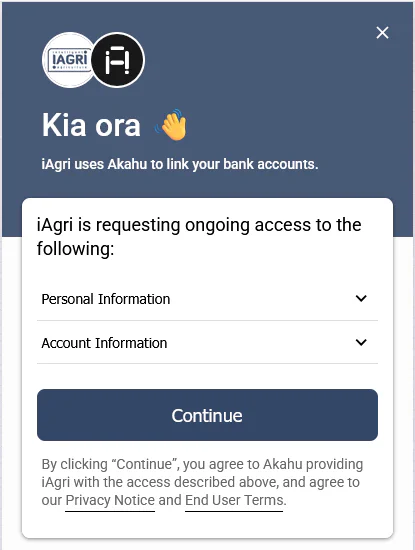
Follow the instructions to connect one or more of your online bank accounts to the iAgri system. When this process is complete, you will be directed back to the “Link Online Bank Accounts” page, where you can specify what to do with the linked bank accounts.
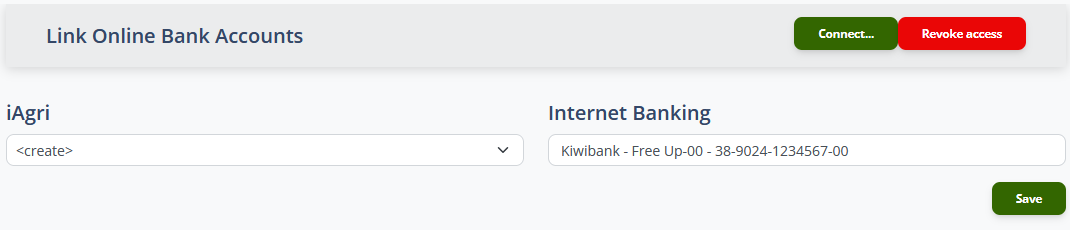
Each of your connected online bank accounts is mapped to a Bank Account entity in the iAgri system. In the right-hand column, your connected bank accounts are displayed. In the left hand column, a drop-down allows to select where transactions from each link account should go.
For each linked bank account, select the appropriate action and then click the Save button. The system will create new bank accounts and save the connection between the iAgri bank accounts and your online bank accounts.
When this process is complete, you will be returned to the cashbook page and any connected bank accounts display will display the icon in the title. Clicking this icon will redirect you back to the “Link Online Bank Accounts” page.
The system will import available transactions from the account for up to 3 years in the past. If you connect an online bank account to an existing iAgri bank account and there are existing transactions in the iAgri bank account before the account is linked, only transactions newer than the latest existing transaction will be imported.
Note
If you have a new bank account and do not want to import a full 3 years of transactions, you can manually create a zero-value transaction for the day before the oldest transaction you want to import. The system will not import any transactions older than that.
If the iAgri bank account has no existing transactions, the system will update the opening balance to match the balance of the linked bank account before the first imported transaction. If the iAgri bank account already has transactions and the balance does not match the linked bank account’s opening balance, the system will create a balancing transaction that will ensure the balances match before any transactions are imported.
This ensures the current balances of iAgri bank account and the linked bank account stay in synch as new transactions are imported.
After the initial import of transactions from the linked account, the system will import new transactions on a daily basis.
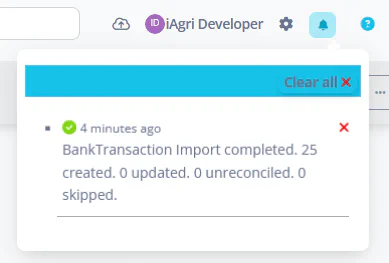
The system with notify you when transactions are imported using the notification system
Note
Occasionally, Akahu will signal that a transaction has changed or been deleted. If the transaction has already been reconciled, the reconciliation will be deleted. The notification message will state how any transactions have been updated or unreconciled due to an import.
The Connect… button gives you access to the Akahu authorisation flow where you can add or remove bank accounts to the list that is available to the system.
The Revoke access button can be used to completely revoke all access to the Akahu service by the system. This will stop new transactions from being automatically imported into the system. Transaction that have already been imported will remain, and will need to be deleted using the Bank Transactions interface.