Title here
Summary here
The Hazard Register is the foundation of iAgri’s Health & Safety module. It provides a complete, auditable record of all hazards identified on your farm, the controls that are in place to manage them, and the schedule for reviewing those controls. Maintaining a current Hazard Register is a legal obligation under the Health and Safety at Work Act 2015 (HSWA) for all farms that employ workers.
To access the Hazard Register, use the
menu option.
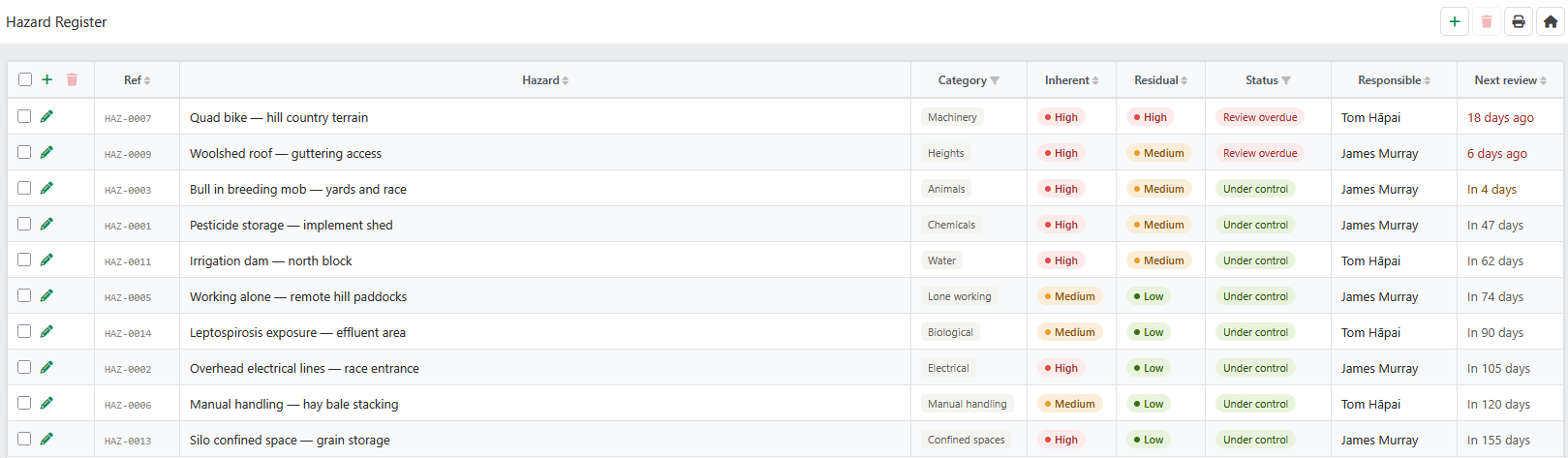
The Hazard Register follows the standard List Page Actions paradigm. Editing individual hazards occurs in the Hazard Editor.
Note
Hazards that have been closed are never deleted from the register. Closed hazards remain in the audit trail so that a complete history of all hazards identified on the farm is preserved.
The Hazard Register list displays all active hazards, sorted by residual risk level (highest first) and then by review due date.
| Field | Meaning |
|---|---|
| Ref | The unique reference number for the hazard, auto-generated when the hazard is first saved (e.g. HAZ-0007). This number is stable for the life of the record and is used in reports, corrective actions, and incident linkages. |
| Hazard | The title of the hazard. Click anywhere on the row to open the Hazard Editor. |
| Category | The type of hazard. See Hazard Categories. |
| Inherent | The risk level of the hazard before any controls are applied. See Risk Scoring. |
| Residual | The risk level of the hazard after controls are applied. This is the risk that the farm is actually carrying. |
| Status | The current management status of the hazard. See Hazard Status. |
| Responsible | The staff member responsible for managing this hazard and ensuring controls remain effective. |
| Next Review | The date by which the hazard must next be reviewed. Overdue review dates are shown in red; dates falling within 7 days are shown in amber. |
Each hazard has a Next Review date that determines when the risk assessment and controls must be revisited. When this date passes, the system automatically changes the hazard status to Review Overdue and the hazard appears as an alert on the H&S home page.
A review is completed by opening the hazard in the Hazard Editor, updating the risk assessment and control records as required, and saving. The system will update the Last Reviewed date to today and clear the Review Overdue status. You should also update the Next Review date to schedule the next review.
Reviews should be triggered by any of the following events, regardless of the scheduled review date:
WorkSafe expectation
A hazard with a risk assessment dated more than 12 months ago and no subsequent review will raise questions in a WorkSafe inspection. High-risk hazards should be reviewed more frequently — quarterly is recommended as a minimum for any hazard with a High residual risk rating.
When a hazard has been eliminated — for example, a piece of dangerous equipment has been replaced, or a process has been changed so that the hazard no longer exists — the hazard should be closed rather than deleted.
To close a hazard, open it in the Hazard Editor, set the Status to Closed, and enter a Closure Reason describing how the hazard was eliminated. The record will be retained in the audit trail and will no longer appear in the active Hazard Register list.
Note
Closed hazards cannot be deleted. They are permanently retained in the audit trail. If a hazard was closed in error, contact your system administrator.
The full Hazard Register can be printed for use in audits, WorkSafe inspections, or farm assurance (NZFAP) assessments. Use the Print button in the page header to generate a printable report of all active hazards, sorted by residual risk level.
The printed report includes each hazard’s reference number, title, category, inherent and residual risk scores, status, responsible person, controls summary, and next review date.