Title here
Summary here
The Site Details page allows you to configure the basic identity and contact information for your Site, as well as regional settings and the file import address.
To access the Site Details page, use the
menu option.
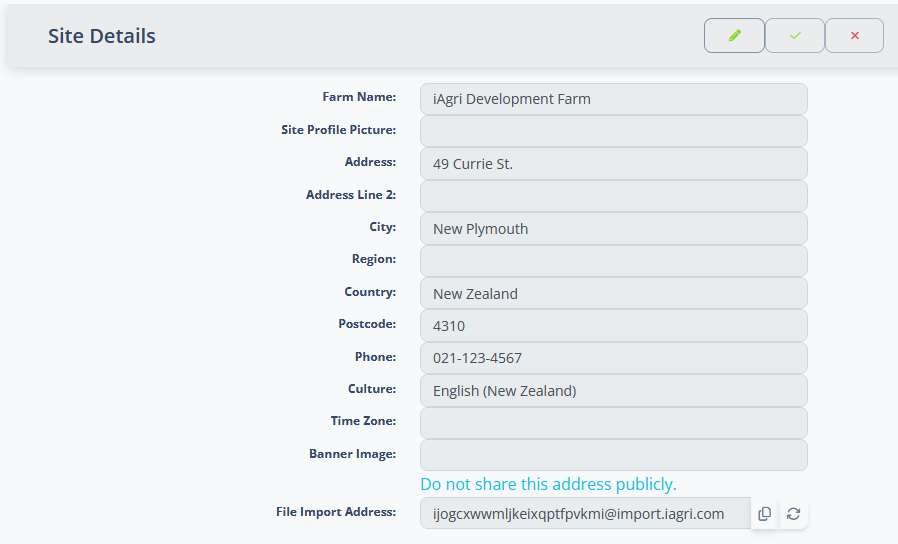
The page displays the current site details in read-only form. Click the button in the toolbar to enter edit mode. Once in edit mode, make your changes and click to save, or to discard changes.
| Field | Description |
|---|---|
| Farm Name | The name of the farm or business. This name appears throughout the system. |
| Site Profile Picture | An optional image that represents the site. When editing, use the file input to upload an image (accepted formats: any image file). Click to remove the current image. |
| Address … Postcode | These fields record the address of the farm or business. |
| Phone | The primary contact phone number for the site. |
| Culture | The locale used for date, number and currency formatting throughout the system. Select the culture that matches your region (e.g. English (New Zealand)). |
| Time Zone | The time zone used for scheduling and date/time display. Select the time zone where the site is located. |
| Banner Image | An optional image displayed as a banner across the top of the site. When editing, use the file input to upload an image. Click to remove the current image. |
| File Import Address | A unique, system-generated email address for importing files by sending them as attachments. Click to copy the address to the clipboard, or to generate a new address. |
Keep File Import Address private
The File Import Address is private — do not share it publicly. Anyone who has this address can submit files to your site. If it has been compromised, click to regenerate it immediately.